FreeCell is one of the most strategic solitaire card games because nearly every card is visible from the start. Instead of relying on hidden cards or a stock pile, you win by planning carefully, using the four free cells wisely, and building each suit from Ace to King.
If you want to learn how to play FreeCell, this guide explains the setup, the rules, legal moves, common mistakes and practical strategy tips. You will also see how FreeCell differs from classic Solitaire and why it is a good choice if you like card games that reward planning more than luck.
You can play FreeCell Solitaire online on Solitaire 365 for free, directly in your browser, with no download and no registration required.
Quick answer: how do you play FreeCell?
To play FreeCell, move all 52 cards to the four foundation piles, sorted by suit from Ace to King. Cards in the tableau are built in descending order with alternating colors, and the four free cells can temporarily hold one card each.
The key is to keep enough free cells open so you can move longer sequences and unlock important cards. You win when every card has been moved to the foundations.
What is FreeCell?
FreeCell is a solitaire game played with one standard 52-card deck. It belongs to the same family as Klondike Solitaire, Spider Solitaire and other single-player card games, but it has a very different rhythm.
In classic Solitaire, many cards begin face down and you discover them as you play. In FreeCell, all cards are face up from the beginning. That means you can see the whole puzzle before making your first move.
This makes FreeCell feel more like a logic game. You still need to organize cards by rank and suit, but the challenge comes from planning the order of your moves and managing limited temporary space.
FreeCell setup
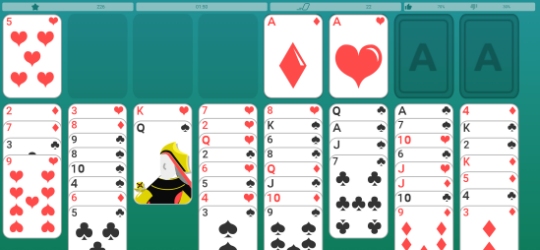
A FreeCell game starts with all 52 cards dealt face up into 8 tableau columns. The first 4 columns each receive 7 cards, and the remaining 4 columns each receive 6 cards.
The board has three main areas:
- Tableau columns: the 8 columns where most card movement happens.
- Free cells: 4 temporary spaces that can hold one card each.
- Foundation piles: 4 piles where cards are built by suit from Ace to King.
There is no stock pile in FreeCell. Every card is already on the table, so you do not draw new cards during the game. Your job is to reorganize the tableau until all cards can move to the foundations.
Objective of the game
The objective of FreeCell is to move every card to the foundation piles. Each foundation pile is built by suit in ascending order.
For example, the hearts foundation starts with the Ace of Hearts, then the 2 of Hearts, then the 3 of Hearts, and continues until the King of Hearts. The same pattern applies to diamonds, clubs and spades.
You win when all four foundations are complete. To reach that point, you need to use the tableau and the free cells to reveal useful moves, unblock low cards and create space for longer sequences.
FreeCell rules
FreeCell rules are simple to learn, but the game becomes more interesting as you start thinking several moves ahead.
The basic rules are:
- You can move a card onto another card that is one rank higher and the opposite color.
- For example, a red 7 can be placed on a black 8.
- Tableau sequences are built in descending order with alternating colors.
- Each free cell can hold one card at a time.
- Foundation piles are built by suit from Ace to King.
- An empty tableau column can usually accept any card.
- You can move a sequence only if you have enough free cells or empty columns available.
The most important rule is that free cells are limited. If you fill all four free cells too early, you may run out of legal moves even when the board still looks playable.
How to move cards in FreeCell
In FreeCell, you can move single cards to the tableau, to a free cell, to a foundation pile or to an empty column.
A card can move to:
- A compatible tableau card, following descending rank and alternating color.
- An empty free cell, if one is available.
- A foundation pile, if it is the next card of the same suit.
- An empty tableau column, if you want to create space or reorganize the board.
FreeCell often looks as if it allows you to move several cards at once, but the move is only possible if those cards could be moved one by one using the available free cells and empty columns. This is why keeping spaces open is so important.
How many cards can you move at once?
The number of cards you can move depends on how many free cells are empty. If you have no empty tableau columns, the basic limit is:
| Empty free cells | Maximum sequence you can move |
|---|---|
| 0 | 1 card |
| 1 | 2 cards |
| 2 | 3 cards |
| 3 | 4 cards |
| 4 | 5 cards |
Empty tableau columns can increase this limit because they give you extra space to reorganize cards. In practice, an empty column is one of the most valuable resources in FreeCell.
Do not rush to fill an empty column with the first card you see. Before using it, ask whether that move helps you free an Ace, build a useful sequence or open more space.
Beginner strategy for FreeCell
The best FreeCell strategy for beginners is to move slowly and keep options open. Because every card is visible, you do not need to guess. You can study the board and decide which cards are blocking progress.
Find the Aces and low cards early
Aces open the foundation piles, so they are usually your first priority. If an Ace is buried under several cards, look for a safe way to uncover it.
After Aces, pay attention to 2s and 3s. Moving low cards to the foundations can reduce clutter and make the tableau easier to manage.
Keep free cells open
Free cells are useful, but they should not become storage for random cards. Every card placed in a free cell should have a reason.
Before moving a card to a free cell, ask what it unlocks. If the move does not create a clear follow-up, it may be better to wait.
Create empty columns with a plan
An empty column can help you move longer sequences, reorganize difficult areas and rescue cards that are trapped deep in the tableau.
However, an empty column is easy to waste. Try to use it for a high card, a long sequence or a move that creates several new options.
Do not send every card to the foundation immediately
Moving cards to the foundations is usually good, but it is not always automatic. Sometimes a low card is still useful in the tableau because it helps you build a sequence or move another card.
As a general rule, Aces and 2s are safe to move early. For higher cards, check whether they are still needed before sending them away.
Common mistakes to avoid
Many FreeCell losses happen because the board becomes blocked after a few careless moves. Avoiding common mistakes can make a big difference.
Try not to:
- Fill all four free cells without a plan.
- Use an empty column for a card that does not help your next move.
- Break a useful sequence before you have room to rebuild it.
- Focus on one column while ignoring better moves elsewhere.
- Move cards to the foundation too quickly when they are still useful in the tableau.
- Start moving cards before checking where the Aces are.
FreeCell rewards patience. The best move is often the one that gives you more flexibility, not the one that simply moves a card right away.
FreeCell vs classic Solitaire
FreeCell and classic Solitaire both ask you to organize cards by rank and suit, but they play very differently.
| Feature | FreeCell | Classic Solitaire |
|---|---|---|
| Hidden cards | No, all cards are visible | Yes, many cards start face down |
| Stock pile | No stock pile | Uses a stock and waste pile |
| Temporary spaces | 4 free cells | No free cells |
| Main challenge | Planning and space management | Revealing hidden cards and using the stock well |
| Luck factor | Lower | Higher |
| Best for | Strategic players | Players who enjoy a traditional solitaire rhythm |
If you enjoy the familiar pace of Klondike Solitaire, you can also play Classic Solitaire. If you want a more open puzzle where every decision is visible from the start, FreeCell is a strong alternative.
You can also explore the full Solitaire games collection to compare FreeCell with Spider Solitaire, TriPeaks Solitaire, Pyramid Solitaire, Golf Solitaire, Yukon Solitaire and other variations.
Practice with the daily FreeCell challenge
Once you understand the rules, the best way to improve is to practice regularly. The Daily FreeCell challenge gives you a fresh board to solve each day, so you can test your planning and build better habits over time.
A daily challenge is useful because it gives your practice a clear routine. Instead of playing only when you feel like it, you can return each day, solve a new layout and notice which types of mistakes you repeat.
FreeCell strategy tips for winning more often
Winning more FreeCell games usually comes down to space management. You need enough room to move sequences, but you also need to avoid wasting the spaces that make those moves possible.
Think two or three moves ahead
Before making a move, look at what it unlocks. A good move should lead to another useful move, not simply change the position of one card.
If you move a card to a free cell, make sure you know how that card will leave the free cell later. Otherwise, it may stay there and reduce your options.
Work on blocked columns first
Some columns are more important than others. A column that traps an Ace, a 2 or another low card may deserve attention early in the game.
You do not need to solve the whole column at once. Small, safe moves that reduce the blockage can create better options later.
Protect your empty spaces
Empty free cells and empty tableau columns are what let you move sequences. The more space you have, the more control you have.
Try to keep at least one free cell open whenever possible. If you use all four, make sure the move creates an immediate benefit, such as freeing an Ace or opening a column.
Use undo as a learning tool
When you play online, undo can help you learn. Try a line of play, see where it leads, and go back if the board becomes blocked.
Over time, this helps you recognize patterns. You will start to see which moves create freedom and which moves quietly trap the board.
Why play FreeCell on Solitaire 365?
Solitaire 365 lets you play FreeCell Solitaire online for free, without installing an app or creating an account. The game opens directly in your browser and works on desktop, tablet and mobile.
It is a good fit for quick breaks, but it also has enough depth for longer sessions. Because all cards are visible, every game feels like a puzzle you can study, test and improve.
If you want a different kind of solitaire challenge, try Spider Solitaire, where you build long descending sequences and clear full runs from King to Ace.
Final tips for playing better
FreeCell is easy to start, but it rewards careful thinking. Keep your free cells open, create empty columns with intention and focus on moves that unlock more options.
When you are new to the game, start by finding Aces and low cards. As you improve, pay more attention to sequences, empty spaces and the order in which you move cards.
When you are ready to practice, play FreeCell Solitaire online for free and apply these tips one game at a time.